
Business Software Integrations: The Complete Guide for 2026
Connect your business tools, automate workflows, and eliminate data silos with strategic software integrations that multiply your technology investments.

Modern businesses rely on dozens of software applications—CRM systems, accounting tools, project management platforms, marketing automation, HR systems, and more. When these tools operate in isolation, data gets duplicated, processes become fragmented, and teams waste time moving information between systems. Software integrations solve this problem by connecting applications, enabling automated data flow, and creating unified workflows that span multiple tools. This comprehensive guide shows you how to build an integrated technology ecosystem that amplifies the value of every tool you use.
The average small business uses 102 different software applications, according to recent studies. Without integration, employees spend up to 20% of their time searching for information across disconnected systems. Integration eliminates this friction, creating seamless experiences where data flows automatically, updates propagate instantly, and comprehensive views emerge without manual aggregation.
Understanding Software Integration
Software integration connects applications so they can share data and coordinate actions. When you enter a new customer in your CRM, integration can automatically create that customer in your invoicing system, add them to relevant marketing lists, and update your reporting dashboards. Without integration, you'd manually duplicate this information across systems—wasting time, creating inconsistencies, and risking errors.
Integrations range from simple data synchronization (keeping customer lists consistent across systems) to complex workflow automation (triggering multi-step processes spanning multiple applications). The sophistication you need depends on your business processes and the capabilities of your tools.
Types of Integration
Native integrations are built directly into applications by their vendors. When two popular tools offer native integration, connecting them typically requires just a few clicks and perhaps some configuration. Native integrations are usually the most reliable and well-supported option when available.
Third-party integration platforms (iPaaS—Integration Platform as a Service) connect applications that don't have native integrations. Tools like Zapier, Make, and Workato act as bridges between applications, enabling connections between thousands of different tools. These platforms typically offer visual workflow builders that make integration accessible without coding.
Custom integrations built through APIs provide maximum flexibility but require development resources. When native integrations don't exist and iPaaS platforms don't support your specific needs, custom development through APIs may be necessary. This approach suits organizations with unique requirements and technical capabilities to build and maintain custom connections.
Integration Approach Comparison
Native Integration
- • Best reliability
- • Vendor supported
- • Easy setup
- • Limited to what vendors build
iPaaS Platform
- • Wide app coverage
- • No coding required
- • Visual workflow builders
- • Ongoing subscription cost
Custom API
- • Maximum flexibility
- • Tailored to exact needs
- • Requires developers
- • Maintenance responsibility
Building Your Integration Strategy
Effective integration starts with strategy, not tools. Before connecting applications, clarify what you're trying to achieve. What data needs to flow where? What processes span multiple systems? What manual work could automation eliminate? Which disconnections cause the most friction? Answering these questions focuses integration efforts on high-impact opportunities.
Map your current technology landscape. List all applications in use, what data each holds, and how information currently moves between them. This inventory reveals integration opportunities—places where manual data transfer could be automated, where duplicate data entry occurs, and where information silos prevent comprehensive views.
Identifying Integration Priorities
Not all integrations deliver equal value. Prioritize based on impact: How much time will automation save? How much will data quality improve? What frustrations will be eliminated? Focus first on high-volume, repetitive processes where integration delivers immediate, measurable benefits.
Consider your core business systems—typically CRM, accounting, and project management. These systems interact with many others and contain data that should be consistent across your technology ecosystem. Integrating core systems first creates a foundation for broader connectivity.
Evaluate integration complexity alongside value. Some high-value integrations might be straightforward to implement; others might require significant effort. Start with quick wins that build momentum and demonstrate value before tackling complex projects.
Data Mapping and Transformation
Different applications model data differently. Your CRM might call it "Account Name" while your invoicing system uses "Company." One system stores phone numbers with formatting; another requires digits only. Integration requires mapping how data fields correspond between systems and defining any transformations needed.
Document your data mappings carefully. When integration breaks or behaves unexpectedly, clear documentation of intended mappings speeds troubleshooting. As systems evolve and add new fields, documentation helps maintain integrations correctly.
Consider data ownership and conflicts. If the same information exists in multiple systems, which is authoritative? When data conflicts, which version wins? Establishing clear data governance prevents integration-induced data quality problems.

Effective integrations keep data synchronized across systems, providing unified views and eliminating manual data entry.
Common Integration Patterns
Certain integration patterns appear across nearly every business, regardless of industry. Understanding these common patterns helps identify opportunities and implement proven approaches rather than reinventing solutions.
CRM and Marketing Integration
Connecting CRM with marketing tools enables personalized, informed marketing based on customer data. When a lead completes a form, they're automatically added to your CRM with activity history. When a customer makes a purchase, marketing automation can trigger relevant follow-up sequences. When sales marks an opportunity lost, marketing might re-engage with nurturing content.
Bi-directional sync keeps both systems current. Marketing engagement data (email opens, content downloads, website visits) flows to CRM, helping sales understand prospect interests. Sales data (conversation notes, pipeline stage, close date) informs marketing segmentation and campaign timing.
Lead scoring often spans both systems—combining marketing engagement signals with CRM data to prioritize outreach. Integration enables this holistic scoring that neither system could achieve alone.
Sales and Finance Integration
When sales closes deals, finance needs to invoice customers, recognize revenue, and track receivables. Integration between CRM and accounting systems automates this handoff, reducing delays and errors while ensuring consistent customer data across systems.
Quote-to-cash integrations span the entire sales-to-payment cycle. Quotes created in CRM flow to invoicing systems. Invoice status flows back to CRM so sales knows when customers have paid. Payment data updates dashboards and reports automatically.
Commission and compensation systems often integrate with both sales and finance systems, pulling deal data to calculate commissions and flowing payment information to payroll. Integration ensures accurate, timely compensation without manual calculation.
HR and Operations Integration
Employee data from HR systems feeds many operational needs. New hire information triggers account provisioning, equipment assignment, and system access setup. Departures reverse these processes—deprovisioning accounts, collecting equipment, and updating access permissions.
Time tracking integrations connect employee hours to payroll processing, project costing, and client billing. What employees record in time tracking systems flows automatically to systems that need that data, eliminating manual data transfer and ensuring consistency.
Organization data from HR—reporting relationships, department assignments, location information—feeds permissions, communication distribution, and reporting systems throughout the organization.
Workflow Automation
Beyond data synchronization, integrations enable workflow automation—multi-step processes that span applications. When a trigger occurs in one system, integration platforms can execute sequences of actions across multiple tools, automating complex business processes.
Building Automated Workflows
Automated workflows typically follow a trigger-action pattern. Something happens (a form submission, a stage change, a date arrival), and that triggers one or more actions (creating records, sending notifications, updating statuses). More complex workflows include conditions, branches, delays, and loops.
Start simple when building automations. Get basic trigger-action workflows working reliably before adding complexity. Test thoroughly in safe environments before activating automations that affect real data or send real communications.
Document your automations so others can understand and maintain them. Visual workflow diagrams, written descriptions of trigger conditions and actions, and notes about business reasons behind automation choices all help future maintainers.
Popular Workflow Automations
- Lead routing: Auto-assign new leads to appropriate sales reps
- Customer onboarding: Trigger welcome sequences after purchase
- Invoice generation: Create invoices when deals close
- Task creation: Generate tasks from form submissions or requests
- Notification workflows: Alert teams when key events occur
- Report distribution: Automatically send scheduled reports
Error Handling and Monitoring
Automations fail—APIs have downtime, data doesn't match expected formats, rate limits get exceeded. Robust automations handle errors gracefully, retrying transient failures, logging problems for investigation, and alerting when human intervention is needed.
Monitor your automations actively. Dashboard views showing automation health, error rates, and throughput help identify problems before they cause business impact. Set up alerts for failed automations so someone investigates promptly.
Plan for maintenance. When connected systems change—new fields, modified APIs, changed authentication—automations may need updating. Include integration maintenance in your regular technical maintenance processes.
Integration Security
Integrations create data pathways between systems, which creates security considerations. Each connection point is a potential vulnerability. Data flowing between systems might be intercepted, modified, or exposed. Integration credentials, if compromised, might grant access to multiple systems simultaneously.
Securing Integration Connections
Use secure authentication methods—OAuth tokens rather than stored passwords, API keys with appropriate permissions rather than admin credentials. Apply the principle of least privilege: integration accounts should have only the permissions necessary for their function, not broad administrative access.
Encrypt data in transit using HTTPS for all API calls. Don't log sensitive data in integration platforms; if debugging requires data visibility, ensure logs are secured and retained minimally.
Regularly audit integration permissions and connections. When employees leave or roles change, update integration credentials. When business processes change, review whether existing integrations still need their access levels.
Data Privacy Considerations
Integrations that move customer data between systems must comply with privacy regulations. Ensure data transfers respect customer consent and privacy policy commitments. If systems are in different jurisdictions, consider data residency requirements.
Document what data flows through each integration. When responding to data subject requests (access, deletion), you'll need to know all systems containing their data—including any receiving data through integrations.
Consider data minimization in integration design. Transfer only the data actually needed for downstream purposes rather than syncing everything "just in case." Less data movement means less exposure and simpler compliance.
Platform-Specific Integrations
Different business platforms offer varying integration capabilities. Understanding your core platforms' integration options helps plan a connected ecosystem.
All-in-One Business Platforms
Integrated business platforms that combine CRM, project management, HR, and finance reduce integration needs by unifying data in a single system. When your sales data, customer records, project information, and financial data share the same database, synchronization between functions is automatic and real-time.
These platforms still need external integrations—connecting to email providers, specialized industry tools, or legacy systems. But the integration burden is dramatically reduced compared to maintaining connections between many separate systems.
Consider consolidation toward integrated platforms when integration maintenance becomes burdensome. Sometimes the effort of maintaining numerous integrations exceeds the value of specialized tools, making platform consolidation the better choice.
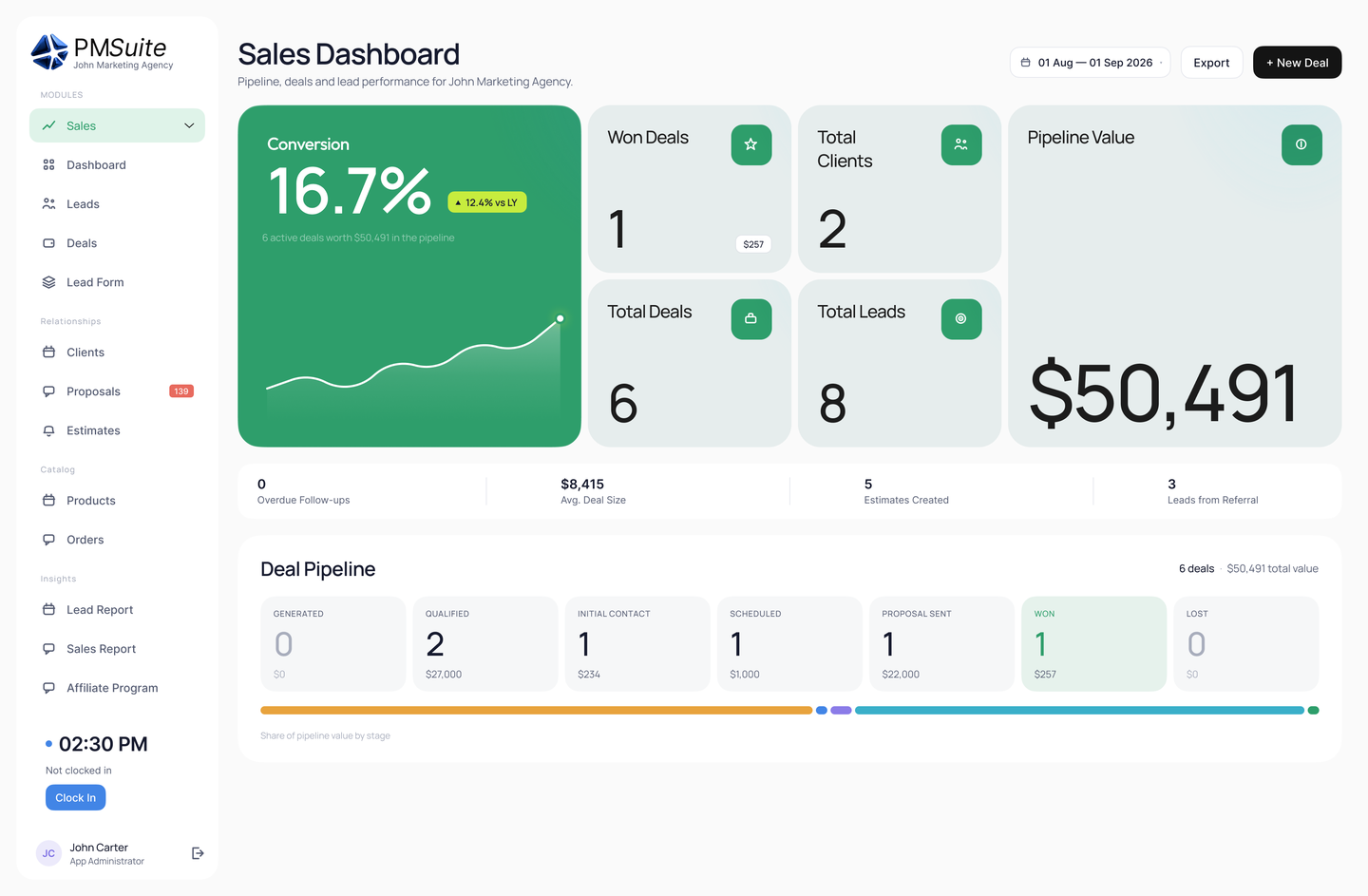
All-in-one platforms reduce integration complexity by unifying business functions in a single system.
Accounting and Finance Systems
Financial systems typically serve as systems of record for monetary data, making them common integration targets. CRM integrations push invoices and payment tracking. HR integrations send payroll data. E-commerce integrations record sales transactions. Expense systems submit approved expenses.
Financial integrations require particular attention to data accuracy. Accounting entries must be correct; synchronization errors can create audit problems. Implement validation before data enters financial systems and reconciliation processes to catch discrepancies.
Communication Platforms
Email, messaging, and video platforms integrate with business systems to enable contextual communication. CRM integrations log email correspondence automatically. Project tools send notifications through messaging platforms. Calendar integrations coordinate meeting scheduling.
Communication integrations improve visibility without requiring behavior change. When email logging happens automatically, salespeople stay focused on selling rather than copying communications to CRM. When notifications flow to messaging channels people already monitor, information reaches them naturally.
Implementing Integrations Successfully
Technical capability is necessary but insufficient for integration success. Successful integration projects require clear objectives, stakeholder alignment, proper testing, and organizational change management. Many technically sound integrations fail to deliver expected value because implementation overlooked these factors.
Planning Your Implementation
Define success criteria before starting implementation. What specific outcomes should the integration achieve? How will you measure success? Having clear targets enables objective assessment of whether implementation delivered expected value.
Identify stakeholders and involve them early. People affected by integrations—those whose data will flow, whose processes will change, whose workflows will automate—should understand and support the project. Their input improves design; their buy-in eases adoption.
Plan for testing thoroughly. Integration testing is more complex than testing individual systems because it involves multiple applications, data transformations, and timing dependencies. Create test scenarios that cover normal operation, error conditions, and edge cases.
Managing the Transition
Integration implementation often requires parallel operation during transition. Run both integrated and manual processes simultaneously until integration proves reliable. This redundancy catches problems before they affect business operations.
Train users on new workflows that integration enables. When data syncs automatically, old manual processes should stop; ensure everyone knows what to do differently. When automation handles tasks, people previously responsible need to know their role has changed.
Communicate broadly about integration changes. People throughout the organization may notice different behavior—data appearing that they didn't enter, notifications from unfamiliar sources, processes happening faster than before. Proactive communication prevents confusion and support tickets.
Ongoing Maintenance
Integrations require ongoing attention. Connected systems change—APIs evolve, data models update, new features emerge. Integration platforms update their capabilities. Business processes that integrations serve change. Without maintenance, integrations gradually degrade.
Assign integration ownership. Someone should be responsible for monitoring integration health, investigating issues, and updating configurations when needed. Without clear ownership, integration problems may go unaddressed until they cause significant business impact.
Review integrations periodically—perhaps quarterly—to ensure they still serve business needs effectively. Remove integrations that no longer add value; enhance those that could do more. Treat your integration ecosystem as a living system requiring continuous cultivation.
Measuring Integration Value
Integration investments should deliver measurable returns. Track metrics that demonstrate value: time saved through automation, errors eliminated through synchronization, decisions improved through unified data. These metrics justify ongoing integration investment and guide priorities for future projects.
Quantifying Benefits
Time savings are often the most visible benefit. If integration eliminates an hour of daily manual data entry, that's 260 hours per year per affected employee. Multiply by labor cost for a dollar value. Track actual time savings through before/after measurements or time studies.
Error reduction provides quality benefits. Manual data entry introduces errors; integration eliminates that source. Track error rates before and after integration to quantify improvement. Consider the cost of errors—not just correction time but customer impact, rework, and reputation damage.
Speed improvements accelerate business processes. If integration eliminates a day from quote-to-invoice cycles, customers get invoices faster, and payment arrives sooner. Improved cash flow has real financial value.
Calculating ROI
Integration ROI compares benefits against costs. Costs include integration platform fees, implementation time, ongoing maintenance, and any required development. Benefits include time savings, error reduction, speed improvements, and enabled capabilities that wouldn't exist without integration.
Consider both direct and indirect benefits. Direct benefits (time saved) are easily measurable. Indirect benefits (better decisions from unified data, improved customer experience from faster response) may be harder to quantify but often represent the larger value.
Project ROI realistically. Optimistic projections that don't materialize undermine credibility for future projects. Conservative estimates that are exceeded build confidence and support for expanded integration investment.
Fewer integrations are needed when core tools already share one database. Browse PMSuite’s HR, CRM, project and finance features or compare PMSuite pricing plans.
Ready to Connect Your Business Systems?
PMSuite integrates your CRM, projects, HR, and finance in one platform—eliminating the complexity of connecting separate tools. Start your free trial today.
PMSuite Team
Integration Experts